
Shopify Product Description Generator-Instantly Create Better Product Descriptions
Shopify Product Description Generator– Prodiify MediaXL
How to Write Descriptions for Your Entire Catalog with AI
Open your Shopify admin and scroll through your products. How many have a real description? Not a supplier’s copy-pasted paragraph. Not two lines you wrote at midnight before launch. A description written for the shopper and for search.
If the honest answer is “not many,” you’re in good company. Writing product descriptions is the task store owners put off the longest, because it never feels urgent until you notice your product pages aren’t ranking, aren’t converting, or both.
The good news is that you no longer have to write them all by hand. A Shopify product description generator can draft the whole catalog in a fraction of the time. The catch is that most people use these tools badly and end up with generic copy that helps neither Google nor buyers.
This guide covers what a strong description actually needs, why the shortcuts backfire, and how to use AI to write descriptions in bulk without sounding like a robot.
Why product descriptions are worth the effort
Shoppers can’t touch your product. The description, along with your photos, does the job of a salesperson. It answers the questions they’d ask in a store: What is it made of? Does it fit? Is it worth the price?
It also does a second job that’s easy to overlook. Your description is one of the main signals Google uses to understand what a product page is about. A thin or duplicated description gives search engines very little to work with, so your page has a hard time matching the searches your customers actually type.
Good descriptions help you in three places:
- Search rankings. Clear, keyword-aware copy helps your page show up for the right queries.
- Conversion rate. Copy that answers objections turns visitors into buyers.
- Fewer support emails. When the details are on the page, fewer people write in to ask.
The problem with manufacturer descriptions and thin pages
Many stores, especially dropshipping and reselling stores, paste in the description the supplier provides. It’s fast, and it’s a trap.
Here’s why. That same paragraph sits on the supplier’s site and on every other store selling the product. Search engines see the same text repeated across dozens of pages and have no reason to rank yours above the rest. This is the duplicate content problem, and it quietly keeps product pages buried.
The other common issue is thin content: a title, one sentence, and a photo. There’s nothing for a shopper to read and nothing for a search engine to index. If you’ve worked through a technical audit, you’ve probably already flagged these pages. Our Shopify SEO checklist covers where product page content fits in the bigger picture.
Neither problem is a design problem. Both come down to words, and both are fixable.
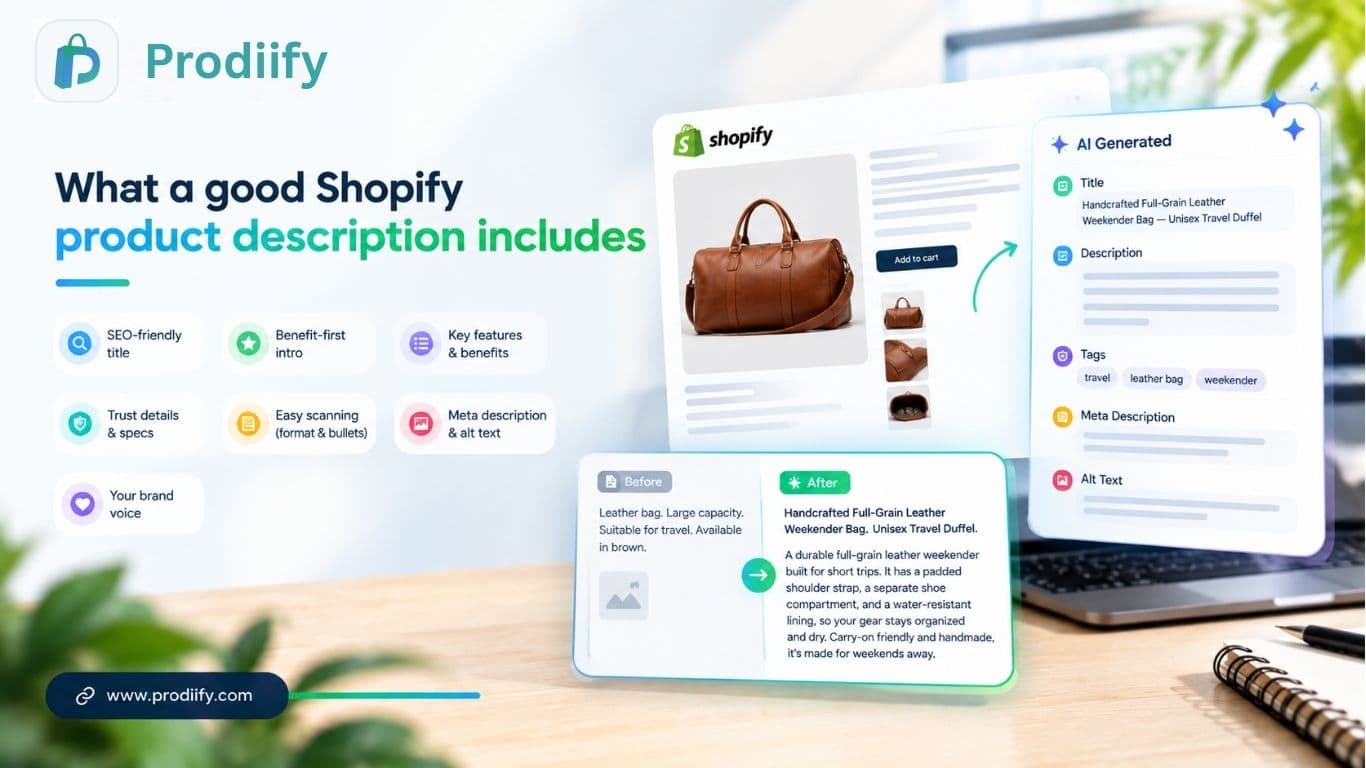
What a good Shopify product description includes
Before you generate anything, know what you’re aiming for. Whether a human or an AI writes it, a strong description usually has these parts:
1. A title that matches how people search. “Handcrafted Full-Grain Leather Weekender Bag” beats “Bag 04.” Put the main keyword near the front and keep it readable.
2. A first line that leads with the benefit. Don’t open with specs. Open with what the product does for the buyer. “Pack a long weekend in one bag” tells them more than “Made from 100% leather.”
3. Features tied to benefits. A padded strap matters because it’s comfortable on long walks. Say so.
4. Details that build trust. Materials, dimensions, care instructions, shipping notes. These are the answers shoppers look for before they buy.
5. Easy scanning. Short paragraphs, a few bullets, no walls of text. Most people skim.
6. A meta description and image alt text. These are small, but search engines read them. Skipping them leaves easy wins on the table.
7. Your brand voice. A luxury candle brand and a skate shop shouldn’t sound alike.
That’s a lot to do for one product. Multiply it by 200 and you can see why it never gets done.
Three ways to write product descriptions in Shopify
You have three realistic options. Each fits a different situation.
| Manual writing | Shopify’s built-in AI | Bulk AI generator | |
|---|---|---|---|
| Speed | Slow | Faster, but one product at a time | Fastest for large catalogs |
| SEO extras (title, meta, tags, alt text) | You do each by hand | Mostly the description text | Can cover the full set together |
| Brand voice | Fully yours | General | Tuned to your store |
| Best for | A handful of hero products | Small catalogs, occasional edits | 50+ products |
Option 1: Write them yourself
For your best sellers and flagship products, this is still worth doing. Nobody knows your product like you do, and a personal touch shows.
The limit is time. Writing descriptions well takes 20 to 30 minutes per product once you add research, editing, and SEO details. That works for ten products. It doesn’t work for a catalog of hundreds.
Option 2: Shopify’s built-in AI tools
Shopify includes AI features inside the admin that can draft a description from a product title and a few details. It’s a handy starting point if you only need to fill in a few pages.
Check how it handles volume before you rely on it. If you’re updating a large catalog, you’ll want to see whether you can run many products at once and whether it also handles your meta descriptions, tags, and alt text. Shopify changes these features often, so confirm the current behavior in your own admin.
Option 3: A bulk AI product description generator
This is where a dedicated app earns its keep. Instead of working product by product, you connect your store, select a group of products (or all of them), and generate the full set of SEO fields together.
With Prodiify, for example, one pass produces the SEO title, description, tags, meta description, and image alt text for each product, written in your store’s voice. You then review, edit, and publish. The key benefit isn’t only speed. It’s that every product ends up with the same complete set of optimized fields, instead of a few great pages and a lot of leftovers.
How to generate product descriptions in bulk (step by step)
Here’s the process using Prodiify. The same logic applies to any tool.
Step 1: Install and connect your store. Add the app from the Shopify App Store. It syncs with your catalog without any theme edits, so nothing on your live storefront changes until you publish.
Step 2: Choose your products. Start with 10 to 20 of your most important pages. You can run the whole catalog later, once you’re happy with the results.
Step 3: Generate. The tool writes an SEO title, description, tags, meta description, and alt text for each product.
Step 4: Review and edit. This is the step people skip, and it matters most. Read every description. Check the facts, fix anything that’s off, and adjust the tone where needed.
Step 5: Publish. Push the approved content straight to your store. Then move on to the next batch.
[Add screenshots of the dashboard, the generate screen, and the published result here.]
Before and after: what changes
Here’s the kind of difference you should expect. Take a leather travel bag with a supplier description like this:
“Leather bag. Large capacity. Suitable for travel. Available in brown.”
An SEO-ready rewrite could read:
Handcrafted Full-Grain Leather Weekender Bag, Unisex Travel Duffel
A durable full-grain leather weekender built for short trips. It has a padded shoulder strap, a separate shoe compartment, and a water-resistant lining, so your gear stays organized and dry. Carry-on friendly and handmade, it’s made for weekends away.
The second version uses the search terms shoppers actually use (“leather weekender bag,” “travel duffel”), answers real questions (Where do my shoes go? Will it get wet?), and gives search engines something specific to index.
Mistakes to avoid when using AI for product descriptions
AI speeds up the writing. It doesn’t replace your judgment. Watch for these:
- Publishing without editing. AI can get a detail wrong, like a material or a size. A wrong fact costs you returns and trust.
- Every product sounding the same. If ten descriptions share one structure and the same phrases, that reads as templated. Vary your inputs and edit.
- Keyword stuffing. Repeating a phrase five times doesn’t help. Write for the shopper first.
- Ignoring your voice. Add a sentence or two of brand personality where it fits.
- Forgetting the rest of the page. A good description works best alongside strong images and clear pricing. For richer layouts, see how A+ content on Shopify can extend your product pages.
Make descriptions work for AI search too
Shoppers now ask tools like ChatGPT, Gemini, and Perplexity what to buy. Those tools pull from clear, specific, well-structured product information. A description that spells out materials, use cases, and who the product is for is easier for them to understand and recommend. We go deeper on this in our guide to Shopify AI search optimization.
FAQs About Shopify Product Description Generator
1.Are AI-generated product descriptions bad for SEO?
Not by themselves. Google’s guidance focuses on whether content is helpful, not on how it was produced. Generic, inaccurate, or copied text is the risk. Reviewed, accurate, specific copy is fine.
2.How do I update product descriptions in bulk on Shopify?
You can edit products one at a time in the admin, import changes through a CSV file, or use an app that generates and publishes descriptions for many products at once.
3.How long should a product description be?
Long enough to answer the buyer’s questions. For many products that’s 100 to 300 words. Complex or high-priced items can go longer.
4.Should I write my own descriptions or use AI?
Use both. Write your flagship products yourself and use AI to cover the rest of the catalog, then edit everything before you publish.
5.Do I need to rewrite supplier descriptions?
Yes, if you want those pages to rank. Identical text used across many stores gives search engines no reason to prefer yours.
Shopify Product Description Generator- Create Persuasive Product Descriptions Fast
Your product descriptions shouldn’t be the thing that holds your store back. Write your best sellers by hand, use a bulk generator for the rest, and always review before you publish. Do that, and every page in your catalog gets a real chance to rank and convert.
Ready to fix your whole catalog? Install Prodiify free and generate SEO-ready descriptions, meta tags, and alt text in one pass.